
Purpose-built for managed service providers
The MSP automation platform for every customer
Deliver hybrid IT without the mess — automate onboarding, standardise access, and empower front‑line staff and clients with secure self‑service across every tenant.

MSP challenges slowing every team
From onboarding to billing, fragmented tools create risk, drag, and missed revenue.
Technicians bounce between admin portals, wasting hours and delaying customer outcomes.
Your team still hunts for which customer, OU, group, or licence a user belongs to before solving the issue.
Shared credentials and over-privileged accounts increase the blast radius for every MSP environment.
Users get created, licences assigned, but the data rarely reaches PSA or invoicing unless someone logs it manually.
New hires spend weeks learning tribal processes. Nothing is standardised, so knowledge doesn’t scale.
Your helpdesk handles tasks customers could complete themselves if they had a secure, branded portal.
Meet Atria
The MSP automation platform that unifies hybrid IT
- Built for MSPs managing Microsoft 365, Entra ID, and on-prem AD
- Give helpdesk teams real power with scoped roles and audit trails
- Offer branded self-service so customers handle routine requests safely
How Atria works
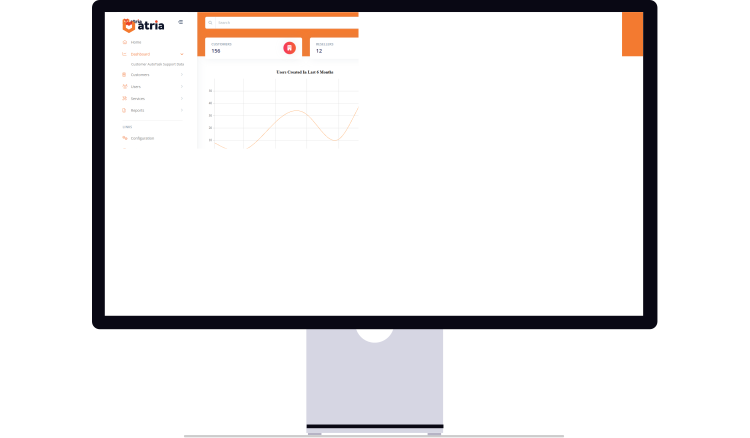
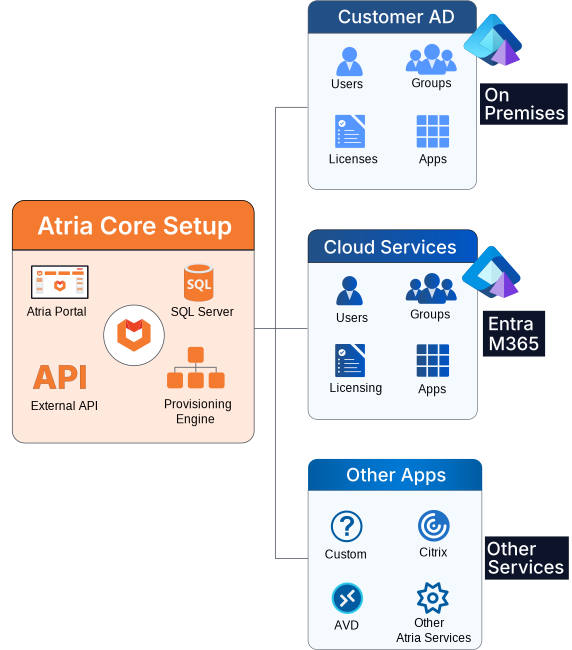
Atria replaces scripts, out-dated documentation, and tribal knowledge with a consistent way to find users, update access, and manage apps across Microsoft 365 and Active Directory. No more RDP access, or asking Sam how to connect to that weird VPN. Pair it with hybrid Active Directory management and Microsoft 365 automation to cover every customer touchpoint.
Centralized User Management
Manage all client directories (AD/Azure AD) from one portal. No more switching consoles.
Automated Provisioning Workflows
Templated onboarding/offboarding and licence assignments. Consistent, error‑free set‑up every time.
Secure Delegated Admin
Granular role-based access for techs and clients. Guardrails prevent mistakes and track every change.
Multi-Tenant Architecture
Manage dozens (or hundreds) of clients: standardised front‑end, configurable behind the scenes to suit every set‑up.
Why MSPs Choose Atria
Atria isn't just a tool—it’s the foundation for scaling a profitable, secure, and customer-friendly MSP business.
Save Time, Boost Profits
Automate user onboarding, password changes, application access, and licence updates from a single console so engineers focus on higher-value projects.
Improve Security & Compliance
Remove shared logins, enforce scoped roles, and capture every change for audited password resets and compliance evidence.
Better Customer Experience
Activate 24/7 self‑service, fewer calls and an empowered helpdesk. Exceed SLAs and stand out from your competitors.
Scale Without Chaos
Standardize service delivery, onboard new customers in minutes, and feed accurate data to billing & reporting.

Built for Accountability
You can’t bill what you can’t see. Atria brings full visibility and control of your users and customers, and ensures all changes are tracked.
Every Change Tracked
Audit trails for every action performed. — by your team, customers, or resellers. Know who did what, when.
Smart Billing Integrations
Atria tracks usage and ties it to billing entities. Feed updates directly into your PSA and invoices with PSA integration.
Fits Into Your Stack
Pre-integrated with the usual PSA systems, but also easy to use REST API to plug into any billing platforms. We can even help you do it

Your MSP Stack, Your Control
Atria is a self-hosted management plane, not a SaaS platform. You maintain absolute control over your client data and access.
Deployed on any Windows server in your own cloud or data center. You own the infrastructure.
We do not have access to your environment or your customers’ data. Zero third-party risk.
You control the network, identity, and access policies. Atria fits your security model.
What MSPs Say About Atria
" Atria’s comprehensive user permissions and customisable out‑of‑the‑box roles empower us to confidently offer self‑service to our customers. "
Product Manager
Visory, USA
" We are totally changing how we display services to users by utilizing the Workspace service... the Workspace Import function is so awesome. "
Josh Farlow
CTO, CIO Solutions, USA
" We do not know how we could have coped with our growth without Atria "
Daniel Schweikle
Head of Business Cloud Solutions, Netplans AG, Germany
Explore Core Features
Dive deeper into the building blocks MSPs rely on.
Case studies
Operational scale and consistency in the real world.


MSP FAQs
Common questions about Atria for MSPs
How Atria supports multi-customer operations, delegation, integrations, and service delivery.
How quickly can an MSP start managing a new customer’s users with Atria?
What user and access tasks can an MSP manage with Atria?
How can an MSP let customers manage users without sharing admin accounts?
Atria Workspace gives customers a simpler way to complete MSP-approved user and access tasks without switching between admin tools or learning bespoke group naming conventions. MSPs can adjust built-in roles or create custom roles—for example, allowing a customer to edit users but not delete them.
For changes made through Atria, the audit history records who made the change, when it happened, and which data attributes changed. It also records the user being impersonated, if applicable, and keeps a version history of the data. Shared admin accounts make it difficult to identify who made a change. Changes made directly in Active Directory or Microsoft 365 are not attributed in Atria; if synced back, they appear as system-initiated.
Does Atria replace Microsoft 365, Active Directory, or an MSP’s PSA?
How can Atria help an MSP keep customer usage aligned with billing?
Atria has PSA integrations for ConnectWise Manage, Autotask PSA, and Kaseya BMS. These integrations use actual service usage to update agreement or contract services and quantities, helping keep customer billing aligned with what is delivered. The available sync options differ by PSA. See PSA integrations and details.
For other systems, Atria’s REST API can push Atria data into external systems, and CSV exports provide another option. Bespoke PSA integrations are also possible. Explore REST API and export options.
How is Atria deployed, and can an MSP offer it as a managed service?
How can I tell whether Atria is a good fit for my MSP?
Ready to scale your MSP with less stress?
See the MSP automation platform that standardises service delivery, delegation, and billing across every customer.